XVIDEOAI.CC · ADULT CREATION

XVideo AI Adult Video Generator

Create adult videos from text or permitted images in the XVideo AI browser studio. Direct an original scene or bring a portrait into motion.

Free to explore. Image and video generation uses Credits. About XVideo AI

  • Adults only
  • Consent required
  • Authorized media only
Edited montage · 4 AI-generated clips · MiniMax H3

Start your video with a prompt

Video prompt

Your prompt continues into Text to Video. Sign in and review the available model settings and Credit estimate before submitting.

From a starting idea to a video

Pick an input, describe one movement, then inspect the result before adding more detail.

  1. 01

    Choose your starting point

    Write a scene from scratch, or use an image you have permission to animate.

  2. 02

    Direct one clear movement

    Ask for one subject action. Add a camera direction only when it matters to the shot.

  3. 03

    Watch, review, and refine

    Check the opening, middle and final frames. Use History to reopen a completed task.

What our XVideo AI samples show

Watch the clip, inspect what changed and try the original brief. Each case keeps its video, observations and prompt together.

Original text → generated fashion clip · 9:16 request

Create an editorial from text

An original fashion brief sets the green blazer, architectural showroom, and restrained camera movement.

What we saw. The subject turns from a side profile toward the camera while her hands move at the blazer lapels. The green jacket and car setting remain recognizable through the shot.

Try next. Test one gesture first. Keeping the pose simple makes the head turn and lapel movement easier to judge before adding a walk or a larger camera move.

Sample settings and limits
Input
Original text brief
Model
MiniMax H3 LoRA
Requested
5s · 768p
Original file
768 × 1344 · 24 fps · 5.17s

Hand positions change during the clip. Check fine finger and fabric details in the original video before using a frame; this sample does not establish consistent anatomy across generations.

These are observations from one clip. The suggested next brief has not been render-tested.

Text to Video · MiniMax H3 LoRA · 5s · 768p

Read and copy the original prompt

A fictional East Asian adult woman aged 31 wearing a lime-green tailored blazer over an opaque white crewneck T-shirt and black tailored trousers, standing beside a dark parked car in a modern architectural showroom. Eye-level medium fashion portrait centered on her face and jacket, realistic adult proportions, calm confident expression, soft cinematic side lighting and charcoal background. She gently adjusts the jacket lapel and turns her face toward the camera, a slow restrained camera push-in. Preserve clothing and facial identity. Natural subtle movement, quiet ambience, no speech, no text or logos.
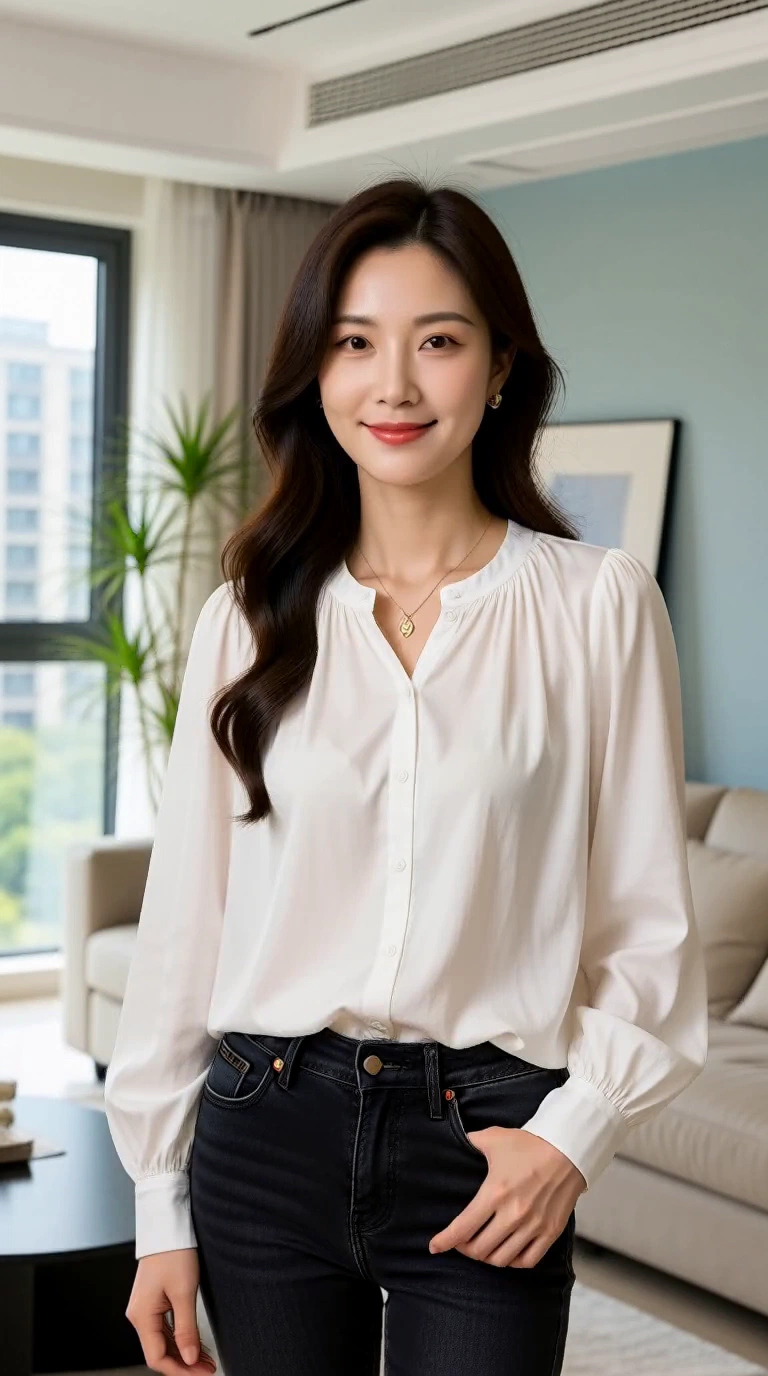
Source image → generated portrait clip · MiniMax H3 LoRA

Animate a daylight portrait

Start from a generated fictional adult wearing a white blouse. A gentle head turn and slow push-in add motion to the source.

What we saw. The head and upper body turn toward the window, then return toward the camera. The white blouse and room remain recognizable, but the shoulders and framing shift with the movement.

Try next. If retaining the source composition matters most, ask for a smaller turn and a locked camera. Treat that as a new direction to test, not a guaranteed correction.

Sample settings and limits
Input
Generated fictional-adult source image
Model
MiniMax H3 LoRA
Requested
5s · 768p
Original file
768 × 1344 · 24 fps · 5.17s

The movement is broader than the small head turn in the brief. Image to Video creates a continuation; it does not preserve every source detail or the exact opening framing.

These are observations from one clip. The suggested next brief has not been render-tested.

Image to Video · MiniMax H3 LoRA · 5s · 768p

Read and copy the original prompt

The adult woman looks toward the window, then gently turns back toward the camera with a small natural smile. One calm blink, subtle hair movement, slow camera push-in. Preserve the fictional adult identity, buttoned white blouse and apartment background. Quiet room ambience, no speech, no text.

Choose the plan that fits how you create

Subscribe to unlock Premium generation options and keep completed generations without automatic expiry. Without an active subscription, completed results remain available for 7 days; one-time Packs add non-expiring Credits but do not extend media retention.

Billing interval
Save 16.7%

Creator

Start with monthly Credits and full Premium access throughout each paid 30-day period.

$12.49per month

Billed $149.90 yearly

145 credits each billing period

Subscribe
  • Premium model and output options
  • Unlocks videos longer than 6 seconds
  • Credits refresh every 30 days
  • Credits never expire: Not included
  • No recurring payment: Not included
Save 16.7%

Studio

Our largest monthly allowance for intensive creation, with full Premium access throughout each paid period.

$49.99per month

Billed $599.90 yearly

975 credits each billing period

Subscribe
  • Premium model and output options
  • Unlocks videos longer than 6 seconds
  • Credits refresh every 30 days
  • Credits never expire: Not included
  • No recurring payment: Not included

XVideo AI questions, answered

How to start, choose an input, review costs, and identify the service you are using.

What is XVideo AI?

XVideo AI is the operating brand of the browser-based adult creation service at xvideoai.cc. Start from a text prompt or a permitted image, then choose a model and direct the motion. You can explore the studio free; generation uses Credits. About XVideo AI

Is this XVIDEOS or the XVideo mobile app?

XVideo AI at xvideoai.cc is a separate browser-based service from XVIDEOS and similarly named mobile apps. This website has its own accounts and support. Subscriptions purchased from another service do not apply here. Contact support@xvideoai.cc for this website.

Should I start with text or an image?

Use Image to Video when you already have a permitted image and want to begin with its composition. Use Text to Video when you want to describe a scene from the beginning. Related image tools can help create or revise a source image.

How can I get a clearer motion result?

Start with one subject action and one camera direction. If a result changes too much, reduce the movement, simplify the prompt, and use a clearer input image. Generated output can vary, so review each result before using it. Improve a motion brief

What can I do on XVideo AI for free?

You can watch the public examples, write prompts and explore the studio controls for free without signing in. Generating an image or video requires an account and available Credits. The Generate button shows the cost of your selected setup before submission. Pricing and Credits

Can I use real-person images in adult or NSFW projects?

Only if every depicted person is an adult and you have the rights and informed consent required for the intended use. The same rules apply to adult and NSFW projects: minors, non-consensual intimate material, exploitation and unauthorized impersonation are prohibited. Read the content guidelines before uploading. Content guidelines

Explore your next adult video idea

Try the XVideo AI Image to Video controls free with an image you have permission to use. Generation starts only after you sign in and submit a setup using Credits.

Open Image to Video